Missing translations
Find missing locale tables or shared keys in registered String Table Collections, plus entries containing empty or whitespace-only translations.
STRING_TABLE_COMPLETENESS
EMPTY_TRANSLATION
LOCALIZATION QA / UNITY EDITOR
Localization Auditor checks your tables, string references and saved TMP fonts. Review the findings, trace the source, and make corrections in your own workflow.
Local, deterministic scans. English Editor UI. Tested on Unity 6.0.
WHAT IT CHECKS
Surface concrete data issues before your next manual QA pass.
Find missing locale tables or shared keys in registered String Table Collections, plus entries containing empty or whitespace-only translations.
STRING_TABLE_COMPLETENESS
EMPTY_TRANSLATION
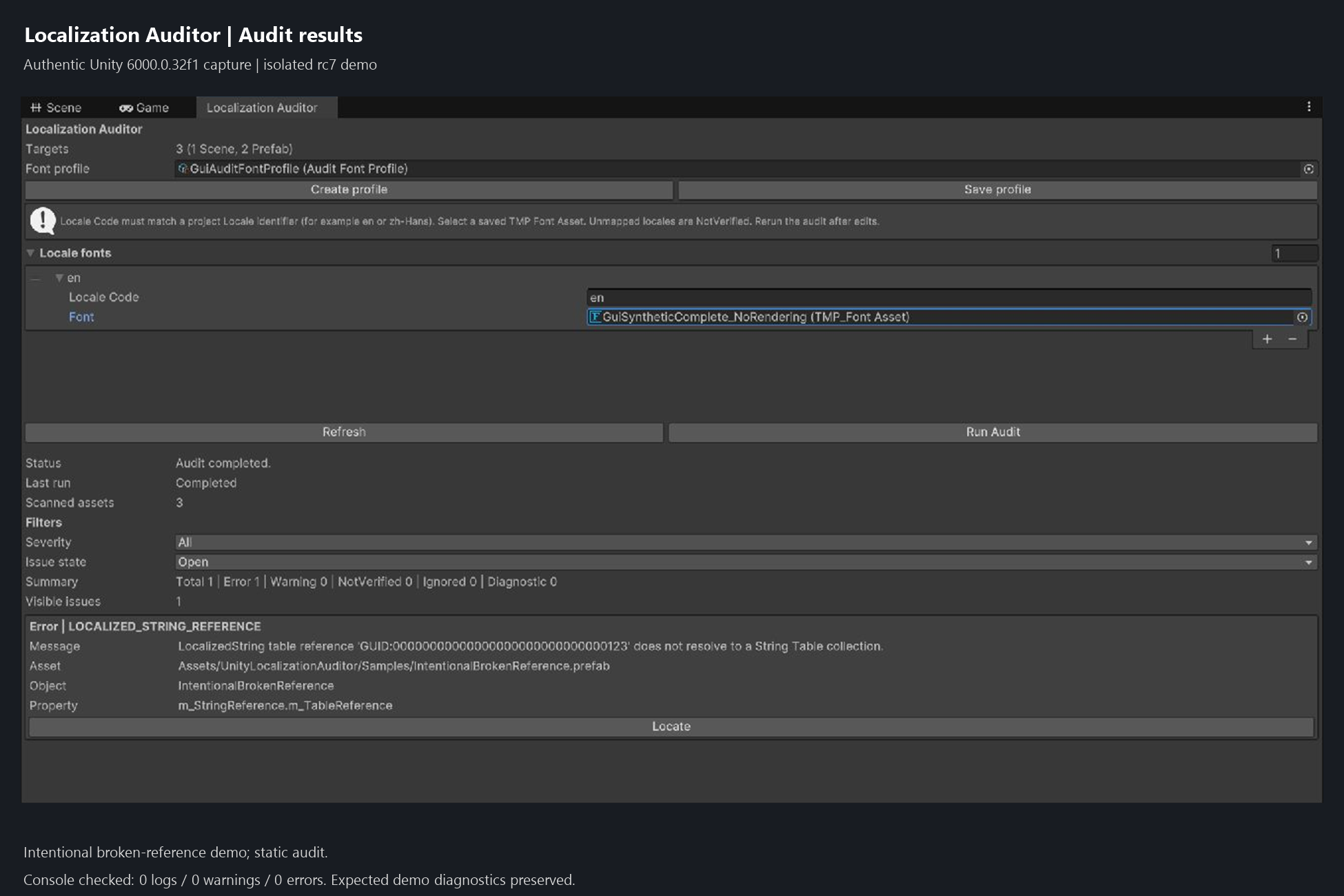
Inspect serialized localized-string references in saved scenes and prefabs. Report unresolved table or entry references and incomplete configuration.
LOCALIZED_STRING_REFERENCE
Check translated characters against explicitly mapped, saved TMP Font Assets and their asset-level fallbacks. Missing mappings remain NotVerified.
TMP_FONT_COVERAGE
The tool reports findings for manual review. It does not translate, repair assets, generate glyphs or render text. Static font coverage is not a runtime rendering guarantee.
FROM REPORT TO SOURCE
Filter by severity and issue state. Use Locate for supported scene and prefab object findings.
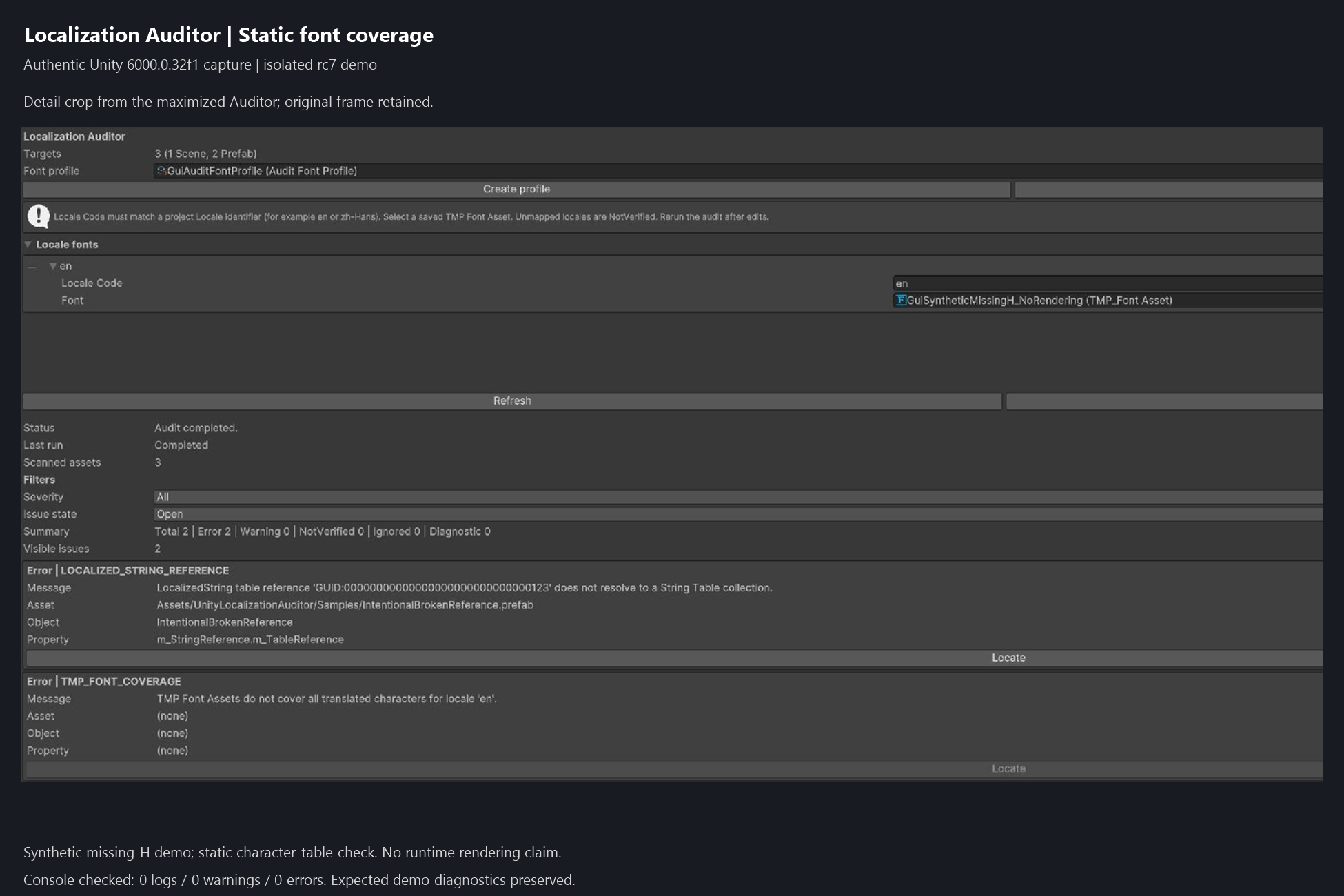
This synthetic font is intentionally missing a character. The report checks stored font data; it does not test dynamic glyph generation or runtime rendering.
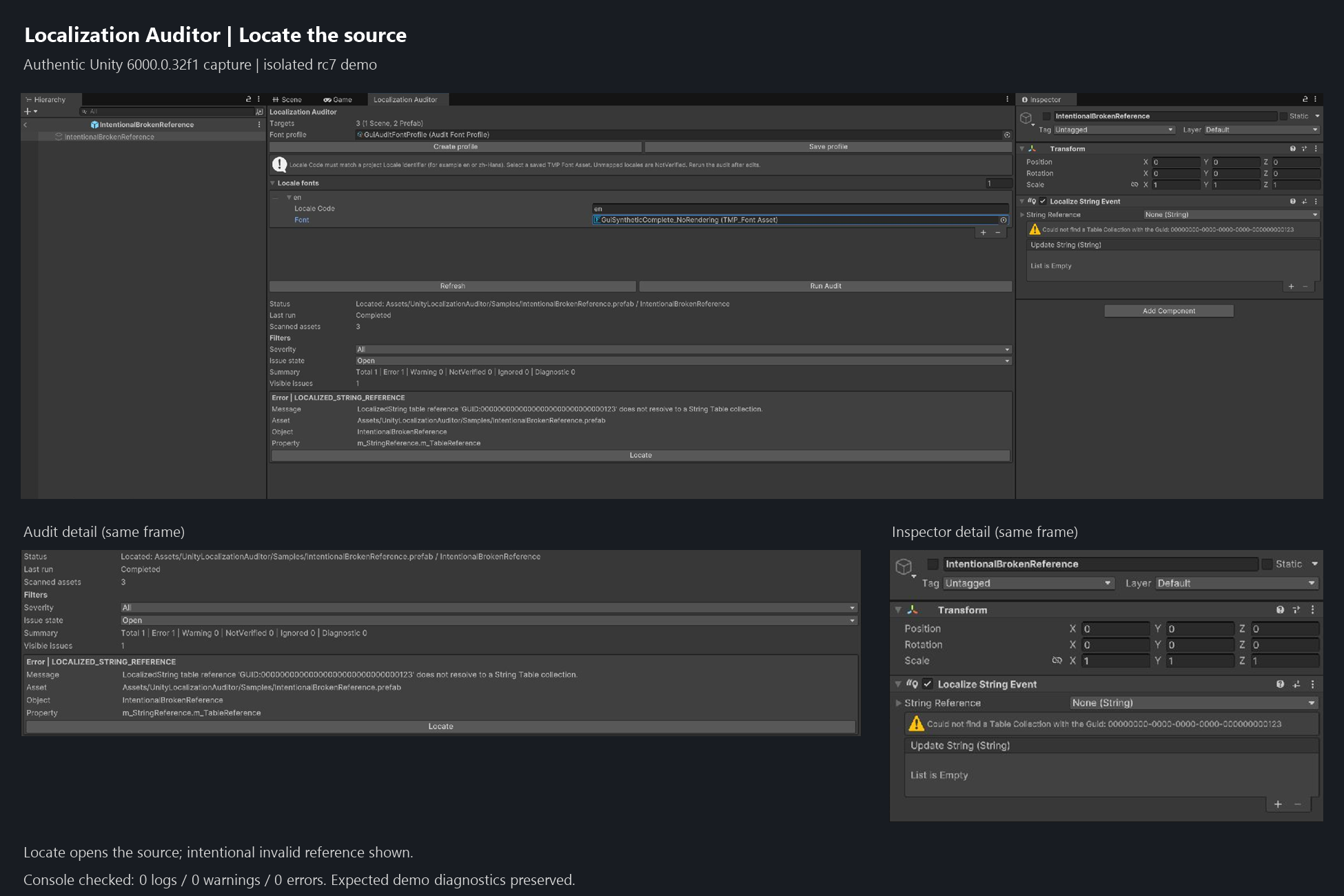
Locate can open Prefab Stage. Load a reported scene first to locate a scene object. Table-level and locationless font findings need manual inspection.
Real Unity 6000.0.32f1 captures from the isolated rc7 demo, cropped to the relevant panels. The broken reference and missing-H font are intentional test cases. Font coverage checks saved character data, not runtime rendering. Open each image for full-size detail.
DOCUMENTATION
A short path from installation to an informed report.
Back up or commit your project. Install the required project packages, then import the supplied .unitypackage, or install the supplied UPM .tgz through Package Manager. Use one distribution per project. Wait for resolution and compilation.
Save the scenes and prefabs you want to audit. Open Window > Localization Auditor in Edit Mode, then click Refresh. Check the scene and prefab target counts. A table-only project cannot start this window audit.
Click Create profile and save it outside the product folder. Add exact, case-sensitive locale codes and saved TMP Font Assets under Locale fonts. Click Save profile. Without a mapping, coverage can remain NotVerified.
Click Run Audit. Read Last run before the severity counts. Review findings and use Locate where supported. After manual corrections, run again; Refresh first if assets changed.
ErrorA detected defect under a check.
WarningA concern that needs review.
NotVerifiedA check could not establish a result.
Completed means the scan finished. Filters change what is visible, not the underlying report. An empty filtered list is not proof of zero findings.
The current rc7 package corrects documentation while retaining the rc6 functional code. Both distribution formats passed import and compilation checks. Use the installation and scope guidance above.
AVAILABILITY
Localization Auditor is being prepared for release. A store link will be added when the listing is available.
SUPPORT
Questions, installation problems or an unexpected finding? Contact support by email.
tanxiangdong72@gmail.comEmail opens your mail app. This website does not submit a ticket or collect form data.
Do not send private project source, credentials, customer data or licensed third-party assets. Start with a minimal description and redacted evidence.
COMMON QUESTIONS
No. Audits report findings for manual review and do not save scenes, prefabs, tables or fonts. Creating and saving a font profile are separate, explicit actions.
No. It inspects characters in stored translation strings against configured saved TMP Font Assets and their asset fallbacks. It does not simulate dynamic atlases, runtime substitutions or final rendering, and does not certify shaping, bidirectional layout, clipping or readability. Test representative localized UI in your actual runtime setup.
Refresh needs saved scene or prefab targets under Assets; a table-only project cannot start this entry point. Invalid font-profile rows can also block a run. Missing or uninspectable locale fonts produce NotVerified, which is neither a pass nor proof of missing glyphs. Check exact locale codes and saved TMP assets.
Read the first Console error. The recorded Localization 1.5.12 / Addressables 2.2.2 host could fail in upstream Addressables example-test code without Test Framework, even without the Auditor. Retain Test Framework 1.4.5 in the verified configuration. Test-Framework-free operation and alternative dependency fixes are unverified.
The rc6 functional code was tested on Windows with Unity 6000.0.32f1: 181 EditMode passes, zero failures and one graphics-only skip. The documentation-corrected rc7 package passed import and compilation checks in both distribution formats, plus Publishing Tools validation with 37 passes, zero warnings and zero failures. The 181-test result belongs to rc6, not a new rc7 regression run. These local checks do not establish marketplace approval, Unity 6.5 compatibility or runtime rendering correctness.
Back up first and keep project-owned profiles, fonts and translations outside product and sample folders. Update through the same distribution route and rerun after compilation. Remove the Auditor package through Package Manager for UPM, or remove its Assets/UnityLocalizationAuditor folder for an Assets installation after preserving custom content. Keep dependencies still used by your project. Auditor profile assets can show a missing script after removal; retain them for reinstall or review them separately.
The optional original demo deliberately includes an unresolved prefab string reference so you can practice reviewing and locating a finding. Without a font mapping, coverage remains NotVerified. The demo does not bundle a font or a runtime text renderer.
PRIVACY
Localization Auditor runs deterministic scans locally in the Unity Editor. It does not upload your project to a cloud service.
This website has no custom data-collection forms, analytics scripts or product account system. Site hosting and email providers may process requests or messages under their own policies. If you email support, the information you choose to send is used to address your request.